New harmon.ie
 What’s New in New harmon.ie
Outlook add-in 1.10 / Desktop app 1.2 (June 2026)
- Copy, cut, and paste files:
- Outlook add-in: Copy or move files between Microsoft 365 locations within harmon.ie, for example from OneDrive to a SharePoint folder or from one SharePoint folder to another, using Copy (
 ) / Cut (
 ) / Paste (
 ) from the right-click menu or keyboard shortcuts (Ctrl+C / Ctrl+X / Ctrl+V).
 - Desktop app: In addition, Copy / Cut / Paste integrates with the native clipboard: paste files into File Explorer or an Outlook email, or paste files from your computer into harmon.ie to upload them.
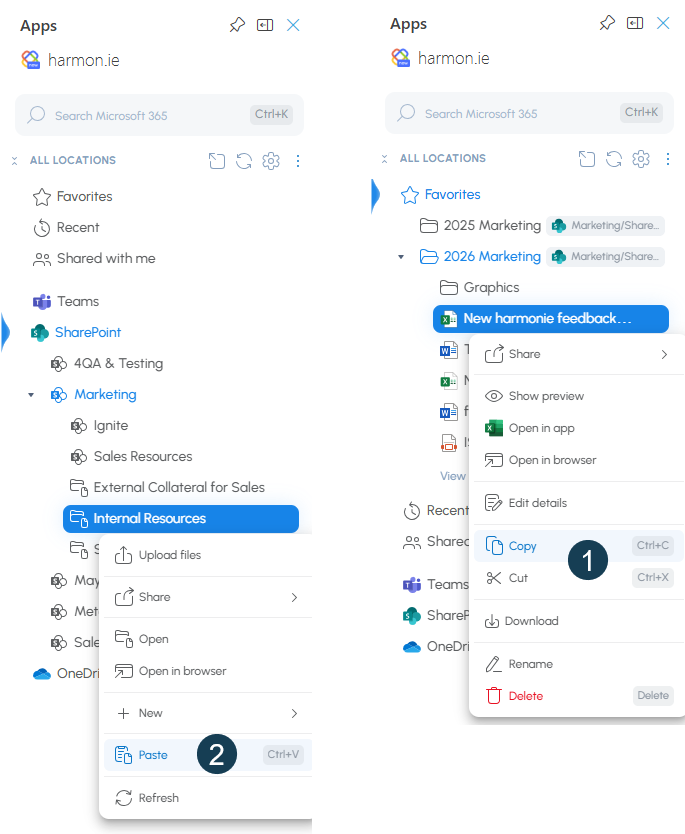
- Outlook add-in: Copy or move files between Microsoft 365 locations within harmon.ie, for example from OneDrive to a SharePoint folder or from one SharePoint folder to another, using Copy (
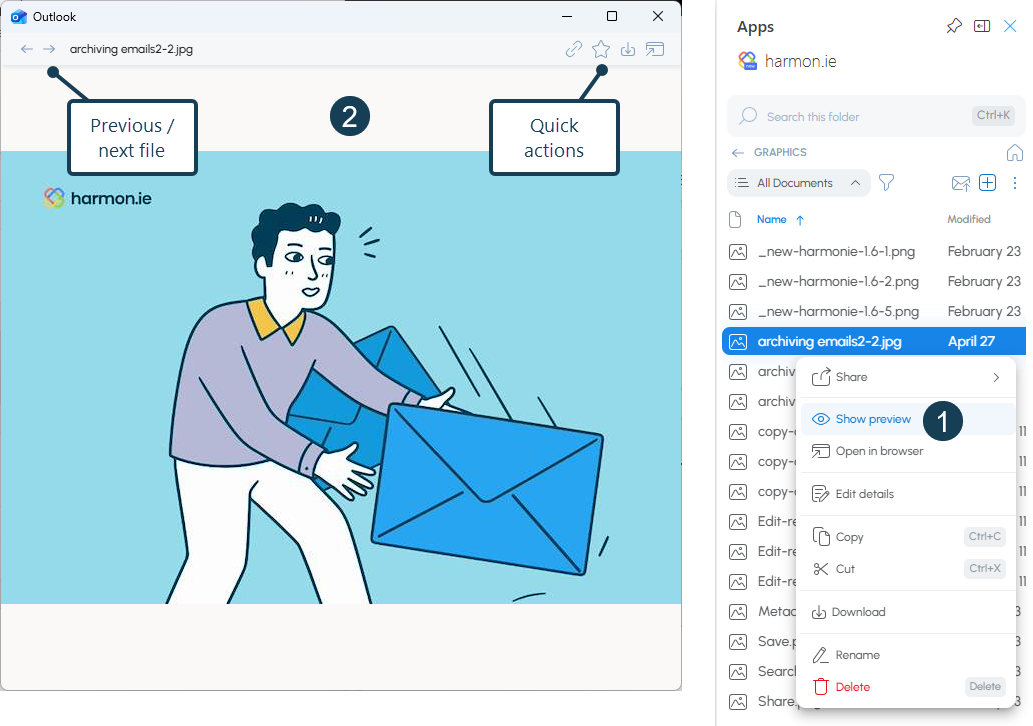
- Preview documents: Open a full preview of any document in a separate window without opening it. Use the previous and next arrows to browse other files in the same location, and access quick actions (Copy link, Favorite, Download, Open in app, and Open in browser) directly from the preview.
- Provision sites and restrict site management (Admin): Administrators can now define the SharePoint sites all users see on sign-in from the Admin tab. Provisioned sites cannot be removed by users. Admins can also optionally restrict users from adding additional sites, without registry keys.
Outlook add-in 1.9 / Desktop app 1.1 (May 2026)
- Download and Save As: Save a local copy of any Microsoft 365 file to your computer. In the harmon.ie add-in, right-click a file and select Download (
 ) — the file is saved to your downloads folder. In the harmon.ie desktop app, use Save As () to choose your destination folder. See Download and Save As.
 - Improved opening of PDF and email files in desktop apps: When the harmon.ie desktop app is installed and you are signed in, PDF, .eml, and .msg files now open directly in their associated desktop app — no additional prompts required.
- Open New harmon.ie desktop from the add-in: Click Open harmon.ie desktop (
 ) in the harmon.ie add-in to open the New harmon.ie desktop app at the same location you are currently browsing — a wider workspace that stays open independently of Outlook.
 - Last-location memory: harmon.ie now remembers the last section, folder, view, and filter you were viewing and restores it the next time you open the add-in. When you open the desktop app from the add-in, it also opens at the same location.
- Improved sign-in: The Outlook add-in now uses Nested App Authentication (NAA), which delegates sign-in to the Office host; the desktop app uses Web Account Manager (WAM), which delegates sign-in to Windows. In both cases you are prompted to sign in less often, and users in organizations with Conditional Access sign-in requirements can now sign in successfully.
Version 1.8.1 (May 2026)
- Automatically open the property editor after save: A new Edit metadata details setting lets you choose whether harmon.ie opens the property editor after saving an item — always, only when required properties are missing, or never. Admins can override this preference for all users.
- Edit file name when saving: The file name is now visible and editable in the Edit details panel, and in the upload flow when the property editor is configured to open automatically after saving.
- Improved managed metadata selection: In the property editor, clicking a managed metadata field now displays a full drop-down list of available options. Find-as-you-type also works to narrow results quickly.
- Copy Link and Email with Attachment as Quick Actions: Copy Link (
 ) and Email with Attachment (
 ) are now available as Quick Actions — hover over a file to access them directly, or use the footer bar when multiple files are selected.
Email with attachment is not available in Outlook (classic), unless harmon.ie is opened inside an email you’re composing.
) are now available as Quick Actions — hover over a file to access them directly, or use the footer bar when multiple files are selected.
Email with attachment is not available in Outlook (classic), unless harmon.ie is opened inside an email you’re composing. - Mark SharePoint and Teams sites as favorites.
Version 1.8 (May 2026)
- Edit file details in harmon.ie: The Edit details action now opens a full metadata editor as a panel directly inside harmon.ie — no browser required. Supports all major SharePoint field types, with required fields clearly marked.
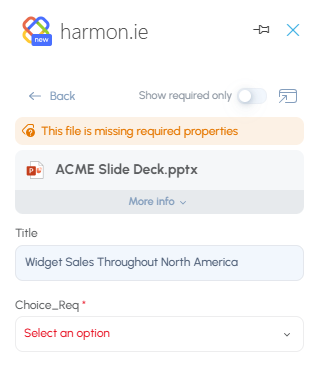
- Edit details for multiple files at once: Select multiple files and update their shared metadata fields in a single operation.
- Prompt to fill in missing details after bulk upload: When uploading multiple files to a location with required metadata fields, harmon.ie can open the bulk details editor for all uploaded files at once — so classification happens at the point of filing. This feature should be enabled in the admin settings.
- Save & Send in Outlook (classic): Save & Send is now available in Outlook (classic). Open the harmon.ie sidebar while composing, hover over the save location, and click Save & Send, then send the email manually from Outlook.
Outlook add-in 1.7 / Desktop app 1.0 (March 2026)
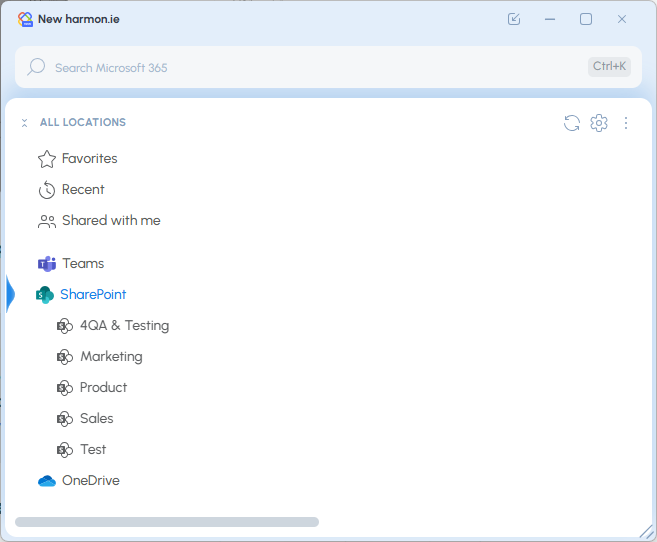
The harmon.ie desktop app provides a dedicated workspace for managing Microsoft 365 content in a single app outside of Outlook.
It enables users to easily find, update, upload, and create documents across SharePoint, Teams, and OneDrive in a larger, always-available interface.
The desktop app also lays the foundation for upcoming capabilities, including automation and AI features that will streamline email and document management workflows.
- Download New harmon.ie desktop app.
- See New harmon.ie admin guide for central deployment instructions.
Version 1.6.1 (February 2026)
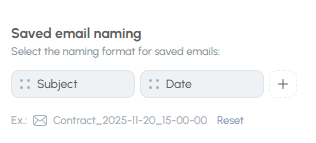
- Email name configuration (Admin feature):
harmon.ie admins can now configure the file name of emails saved to Microsoft 365.
The file name can be constructed from Subject, Date, and/or Sender, in any order.
- UI improvements:
- Increased the width of the Name column in the Content view.
- Enabled the Settings action when opening harmon.ie in compose mode.
- Improved the horizontal scrollbar in the Home view.
- Fixes:
- Fixed hidden hover actions when space is limited.
- Save & Send in Outlook (classic): Removed Save & Send support to ensure stable and predictable behavior on this platform.
- Removed the Save & Send “Ask me every time” option from user & admin settings following Outlook platform behavior that affects its expected operation.
Version 1.6 (February 2026)
- Enhanced location search and filtering:
- Search as you type was added to the Content view, allowing quick search in Microsoft 365 locations as well as in harmon.ie groups (such as Favorites, Recent, Shared with Me, Chats and Meetings).
- Filter by type (
 ) is now available in the Content view and in search results.
 - Filter emails lets you further filter emails to show only emails with attachments.
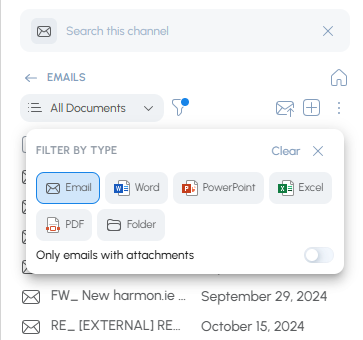
- Search results are displayed in your current view, so you don’t lose context.
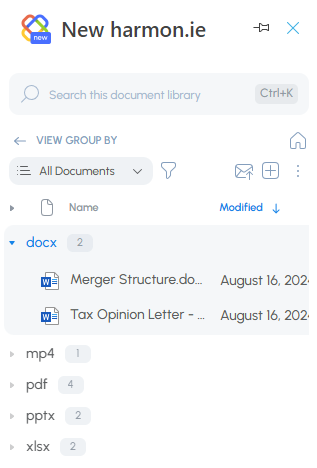
- Group By views: harmon.ie now supports views that are defined with Group By settings, showing items just like in SharePoint.
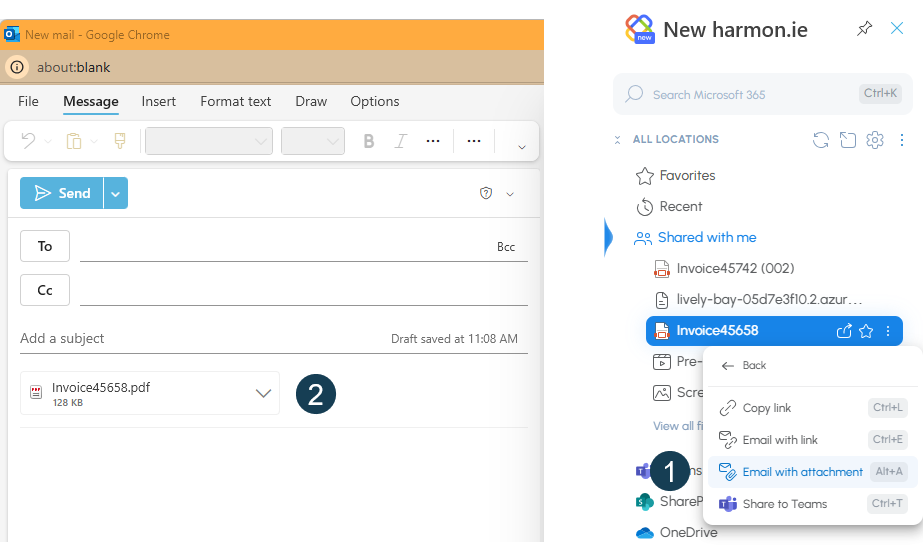
- Email with attachments: You no longer have to be in compose mode to add attachments to your email. The improved Email with attachment action creates a new email and attaches items directly.
- Email with attachment is not available in Outlook (classic). Use Add as attachment instead.
- In Outlook for Mac, you may have to allow Outlook to open a pop-out email: Open Outlook Settings > Mail > Compose and reply, select Pop-out to a new window and then click Save.
- This feature requires an additional permission that was introduced in version 1.3. If this permission was not granted yet, Email with attachment will not be available.
Version 1.5 (November 2025)
- Improved drag and drop support: You can now save emails or attachments with a simple drag and drop in all Outlook apps, including the Outlook for Windows (new) and Outlook on the web.
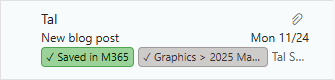
- Automatic email categories: Emails saved to Microsoft 365 are now categorized in your inbox with a Saved in M365 category and a location category. This makes it easy to see which emails were saved, filter saved emails, and identify where each email was stored. This feature requires admin consent, and can be switched on or off in settings. See enable email categories.
Version 1.4 (September 2025)
- Sort file list by column: Click on a column header in harmon.ie’s Content view to sort the file list by this column, in ascending or descending order.
- Required metadata enforcement: harmon.ie Admins can configure harmon.ie to open the details editor when saving to a location with required properties that lack default values. In this case, the details editor opens automatically. Applies to single file uploads.
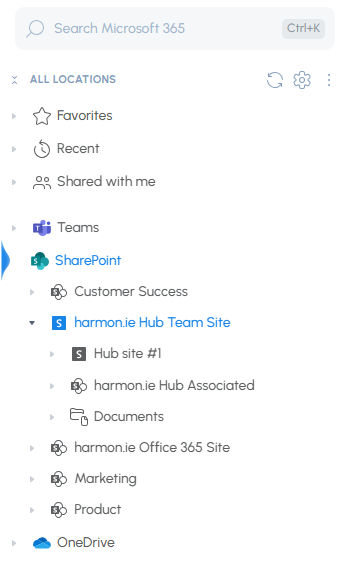
- Hub site support: You can now add a SharePoint hub site to harmon.ie, making it easy to navigate and search across all connected sites from one place.
- Improved file thumbnails: harmon.ie now shows file thumbnails after hovering for 2 seconds on a file. Only one thumbnail can be shown at a time.
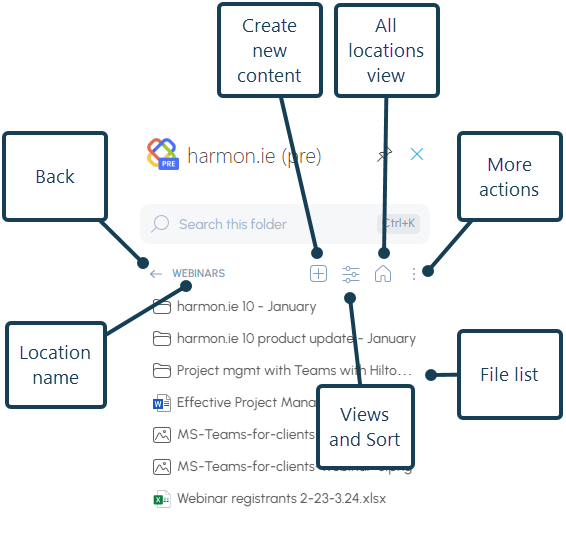
- Minor UX changes in the Content view:
- The Save email action (
 ) is now in the main toolbar and not under the New action (
 ).
). - The View selector is now in the main toolbar.
- The Sort icon was removed. Sorting is now done by clicking a column header.
- The Save email action (
Version 1.3 (August 2025)
Please follow the steps below to update New harmon.ie to version 1.3. Note that it may take up to 72 hours for the updated add-in to appear for users.
Admin guide: Make the new features available
To enable Save & send and Shared mailbox access, a Microsoft 365 admin must:
- NEW USERS: Deploy New harmon.ie from the Microsoft 365 Admin Center.
- EXISTING USERS: Review and approve the updated version of the add-in in the Microsoft 365 Admin Center.
- ALL USERS: Grant consent to New harmon.ie to access shared mailboxes.
If a user installed the add-in directly from AppSource, the new features will not work—even after the add-in is updated. A Microsoft 365 admin must deploy New harmon.ie to make the features available. (This is due to a temporary Microsoft limitation.)
Feature list
-
Save & send: You can now save a sent email and its attachments to Microsoft 365 and send it—in one step.
This feature requires Microsoft 365 admin consent.
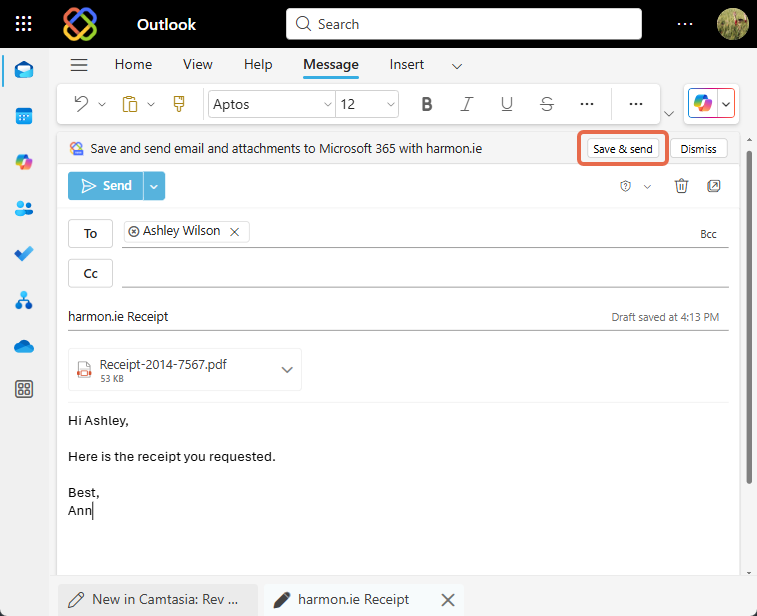
- Save & send is not available in Outlook (classic).
- In Outlook for Mac, you can save the email using harmon.ie, but you’ll need to send it manually from Outlook after saving.
- Shared mailbox support: You can now use New harmon.ie from shared mailboxes to save emails and attachments to SharePoint, Teams, or OneDrive. This feature must be enabled by a Microsoft 365 admin.
-
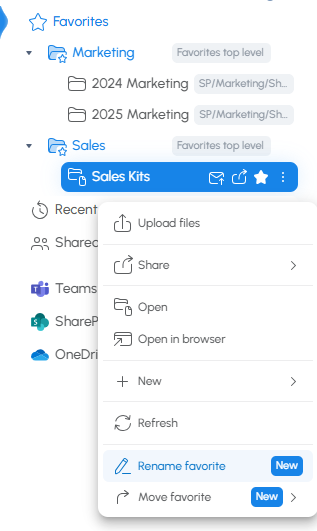
Rename favorites: Rename any favorite location to make it easier to recognize and organize.
Version 1.2.2 (June 2025)
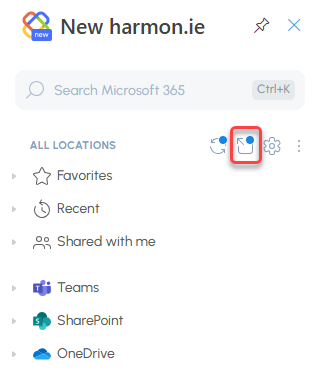
- Drag and drop support: Pop-out harmon.ie (
 ) then drag and drop emails and attachments to the detached sidebar to save them to SharePoint, Teams, or OneDrive. Applies to harmon.ie for Windows (new) and harmon.ie for Web.
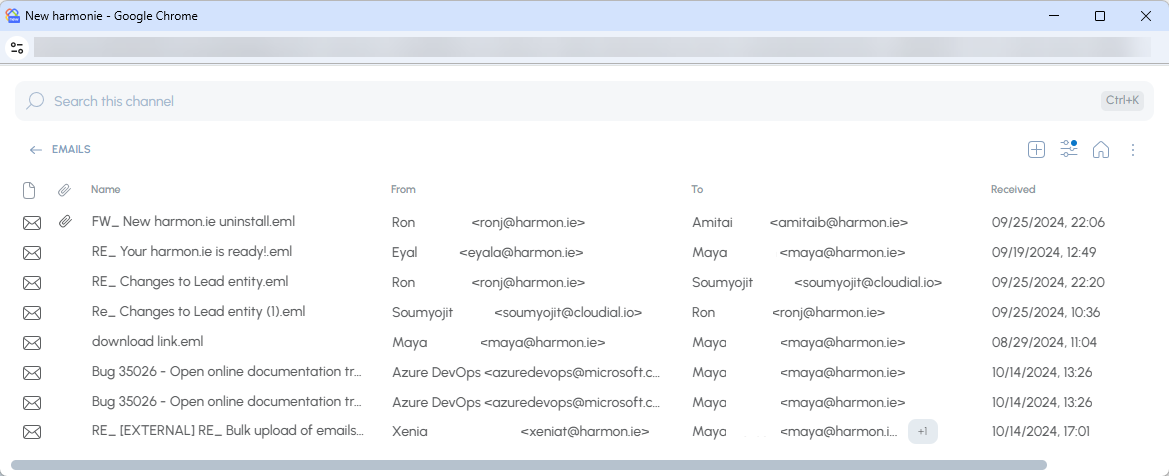
- Full view: Pop-out harmon.ie and get a bigger view — no more scrolling to see all file details. Everything you need in one window.
- Refresh all: Refresh all icon (
 ) in Home view reloads content of expanded locations from Microsoft 365, and also syncs changes from pop-out to sidebar and vice versa.
Version 1.2 (May 2025)
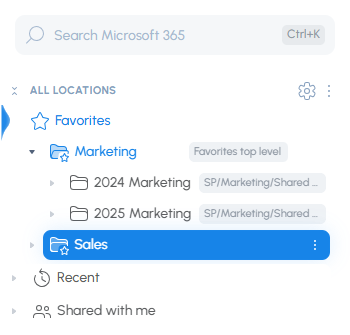
- Favorite folders: Organize your favorite items into folders for quicker access.
- Document sets: Document sets (
 ) are now supported in New harmon.ie.
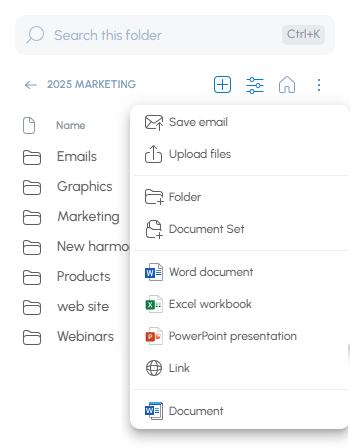
 - Custom content types: Users can now create files of all supported custom content types defined in the SharePoint library — directly from New harmon.ie.
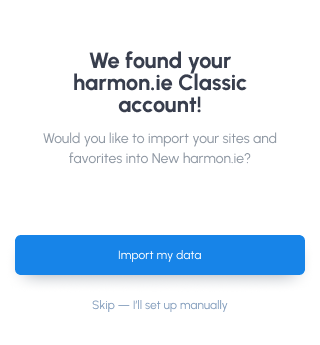
- Import locations from harmon.ie Classic: harmon.ie Classic users (version 10.5+) switching to New harmon.ie can now import SharePoint sites and favorites from harmon.ie Classic and enjoy a speedy setup.
- Email view provisioning: Admins can now configure how harmon.ie creates an email view in SharePoint libraries, including mapping email metadata to columns. Choose whether to always create the view, let users decide when and where to create it, or disable it entirely.
Version 1.1 (February 2025)
- Improved settings dialog: Now divided into General, Advanced, and Admin, offering more options to tailor New harmon.ie’s behavior to your needs.
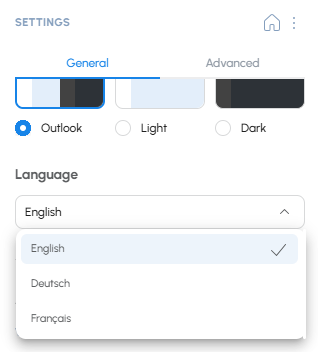
- New language support: New harmon.ie now works in French and German, as well as English. Change the app language from harmon.ie settings.
- Admin central provisioning: IT admins can centrally manage New harmon.ie for all users, including custom email header mapping, Teams, and OneDrive configurations. Read Centrally Configure New harmon.ie for All Users to learn more.
- Group views: Double-click a group in Home view, or right-click and select Open, to view this group in the Content view. Advantages:
- Search inside a group. For example, you can now search all your Teams at once.
- View complete list of files. In the Home view, the number of visible files is limited to 25. The Content view displays all files.
Version 1.0 – GA (December 2024)
- Open PDF and email files (.eml) in desktop apps – You can now open PDF and emails saved to Microsoft 365 in the associated desktop app. OneDrive should be installed on the machine to enable this feature.
- Bulk operations on Microsoft 365 files – Select multiple files and/or locations, then copy links to all, attach all to email, delete all, or mark all as favorite in one click.
- Edit properties – harmon.ie now opens a property editor to edit folder or file’s metadata.
Version 0.6 (October 2024)
- Save attachments: You can now save attachments to Teams or SharePoint, with or without saving the email.
Version 0.5 (September 2024)
- Improved email management:
- Email header mapping: When you save an email to Microsoft 365, harmon.ie can create an Email view and save the email headers (Has attachments, Name, To, From, Received) in corresponding email columns.
By default, harmon.ie suggests creating an Email view in Teams locations. You can configure harmon.ie to create an Email view in SharePoint locations as well. - Email view: When selecting harmon.ie’s Email view, only emails are displayed along with the email headers which are shown in a grid view.
Note that emails moved to Teams or SharePoint using previous versions of New harmon.ie won’t display in the Email View as the email-specific metadata wasn’t captured by those earlier preview versions.
- Email header mapping: When you save an email to Microsoft 365, harmon.ie can create an Email view and save the email headers (Has attachments, Name, To, From, Received) in corresponding email columns.
- SharePoint views: When you open a location in the Content view, a new Views action lets you select a SharePoint or harmon.ie view, making it easier to focus on relevant content.
- View file metadata: The Content view now displays file metadata in a grid view.
- Add Teams sites: Teams are created with a team site. By default, the content of team sites is hidden in harmon.ie. You can now add Teams sites to harmon.ie under the SharePoint group.
Version 0.4 (June 2024)
- Upload Multiple Items: Save & upload multiple emails or files.
- Upload with Drag and Drop: Drag Outlook emails (Outlook (classic) and Outlook for Mac only) or files from the file system.
- Manage Email & File Uploads: Choose between overwriting existing email or file, or saving both.
- Manage app settings: An improved app settings dialog lets you control New harmon.ie theme, how to open files, how many files to display in the Home view, and more.
Version 0.3 (February 2024)
- Quick search (find as you type).
- Search by app and file type.
- Drag and drop to save emails from Outlook and upload files from Windows Explorer (Outlook (classic) and Outlook for Mac only).
- Compose mode – add a link or a file attachment when composing an email.
- Manage files – delete, rename, create new folders, files and links.
- Collapse all button (
 ).
).
Version 0.2 (September 2023)
- Home tree view navigation.
- Content view.
- Save emails to Microsoft 365.
- Upload files to Microsoft 365.
- Global search.
- Quick actions – view thumbnail, open, edit properties in browser.
- Share content – copy link, email with link, share in Teams.
- Manage sites and Teams.