You know how to find a file on your own computer: open File Explorer, pick a folder on the left, and there it is. Finding the same file in SharePoint or Teams is usually a different story, with a browser tab per site, a search that may or may not help, and a few wrong turns along the way. The harmon.ie Desktop app 2.0 closes that gap. It’s a complete redesign that lets you browse SharePoint, Teams, and OneDrive the way you browse folders in File Explorer.
The New harmon.ie Outlook add-in moves to version 2.5 at the same time, with email automation for shared mailboxes and retention labels you can apply when you edit a file’s or email’s details.
Browse SharePoint, Teams, and OneDrive like File Explorer
The new harmon.ie Desktop app puts every Microsoft 365 location you work with in a tree on the left: your favorites, recent and shared locations, and all your Teams, SharePoint sites, and OneDrive. Click a location and its contents open in the middle. The tree always shows where you are, so you keep your bearings even three folders deep in a team site.
Select a file and its preview and properties appear on the right, so you can check you have the right document before you open it. You can edit those properties right there too, for one file or for several at once, which makes SharePoint document management feel like everyday file work instead of a separate chore.
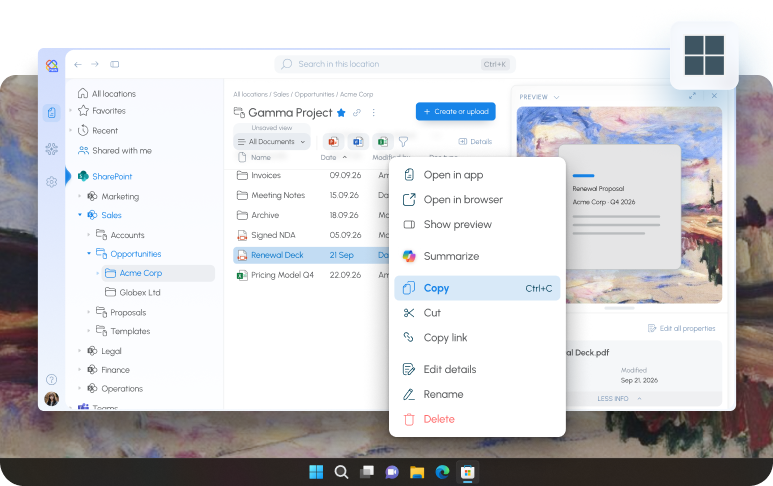
See the latest files without waiting for a sync
It looks like File Explorer, but it isn’t a synced copy of SharePoint. Syncing a library to your computer means setting it up library by library, using disk space on every device, and working with files that are only as current as the last sync. The harmon.ie Desktop app connects directly to Microsoft 365 instead. There are no local copies and no sync engine, and when you open a folder, you see what’s in SharePoint right now, including the files a colleague just added or changed.
For IT, that means one less thing to set up and support on every machine. Learn more about SharePoint document management with harmon.ie.
Start from what you use most
The new Home page brings together shortcuts to SharePoint, Teams, and OneDrive, the folders you recently saved to, and your recent, favorite, and shared files. Drag an email or file onto one of those recent folders and harmon.ie saves it there, so the places you file to most are always one move away.
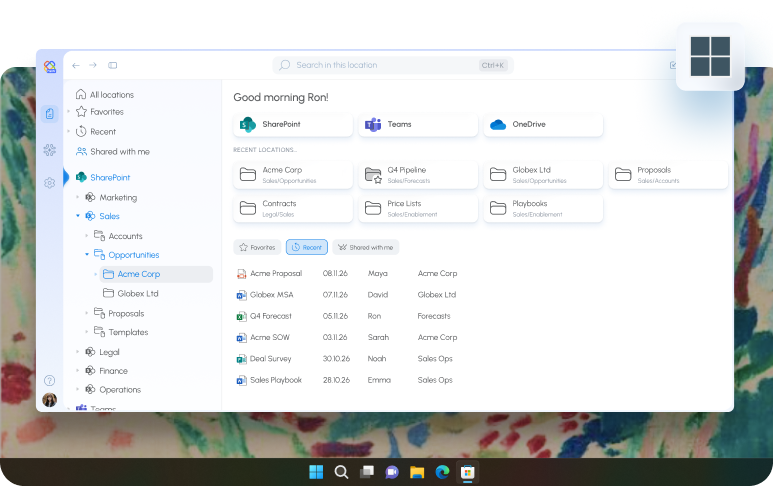
A layout that fits the way you work
Resize the panes to give the file list more room, or hide the tree and the details when you want to focus, and harmon.ie remembers how you like it. In a narrow window, the app shows one pane at a time instead of squeezing all three. You can also use the whole app from the keyboard, moving between panes with a single key.
Email automation comes to shared mailboxes
A lot of important email never reaches a personal inbox. It lands in a shared mailbox for a department, a project, or a client team. With New harmon.ie 2.5, the email automation rules people use in their own mailbox work in shared mailboxes too. Anyone with full access to a shared mailbox can set up a rule, and the emails that match it are saved to the right SharePoint or Teams location without anyone having to remember.
Apply retention labels where you work
When you edit the details of a file or email in harmon.ie, you can now apply a retention label too, and see how long each label keeps the item, just as you would in SharePoint. Content gets the right label where people already work, instead of in a separate step that’s easy to skip. For organizations with email compliance requirements, that’s one less gap between saving an email and governing it.
Designed for the way you work in Microsoft 365
Whether you’re in Outlook or at your desktop, harmon.ie has the same job: put SharePoint, Teams, and OneDrive where you already work, and take filing off your to-do list. The redesigned Desktop app makes Microsoft 365 feel as familiar as the folders on your own computer, and 2.5 brings automatic saving to the inboxes your team shares.
Get started with the New harmon.ie Desktop app
The harmon.ie Desktop app 2.0 is available for Windows, and the Outlook add-in 2.5 is available to all New harmon.ie users. Admins can deploy the Desktop app centrally, as described in the admin guide.